Feature design · LG, 2024
Telehealth Smart Rails
- Shipped
- 1-month research, 3-month design + eng (12.2023 – 03.2024)
- Product designer
- 1 PM, 3 engineers
- Web

- Background
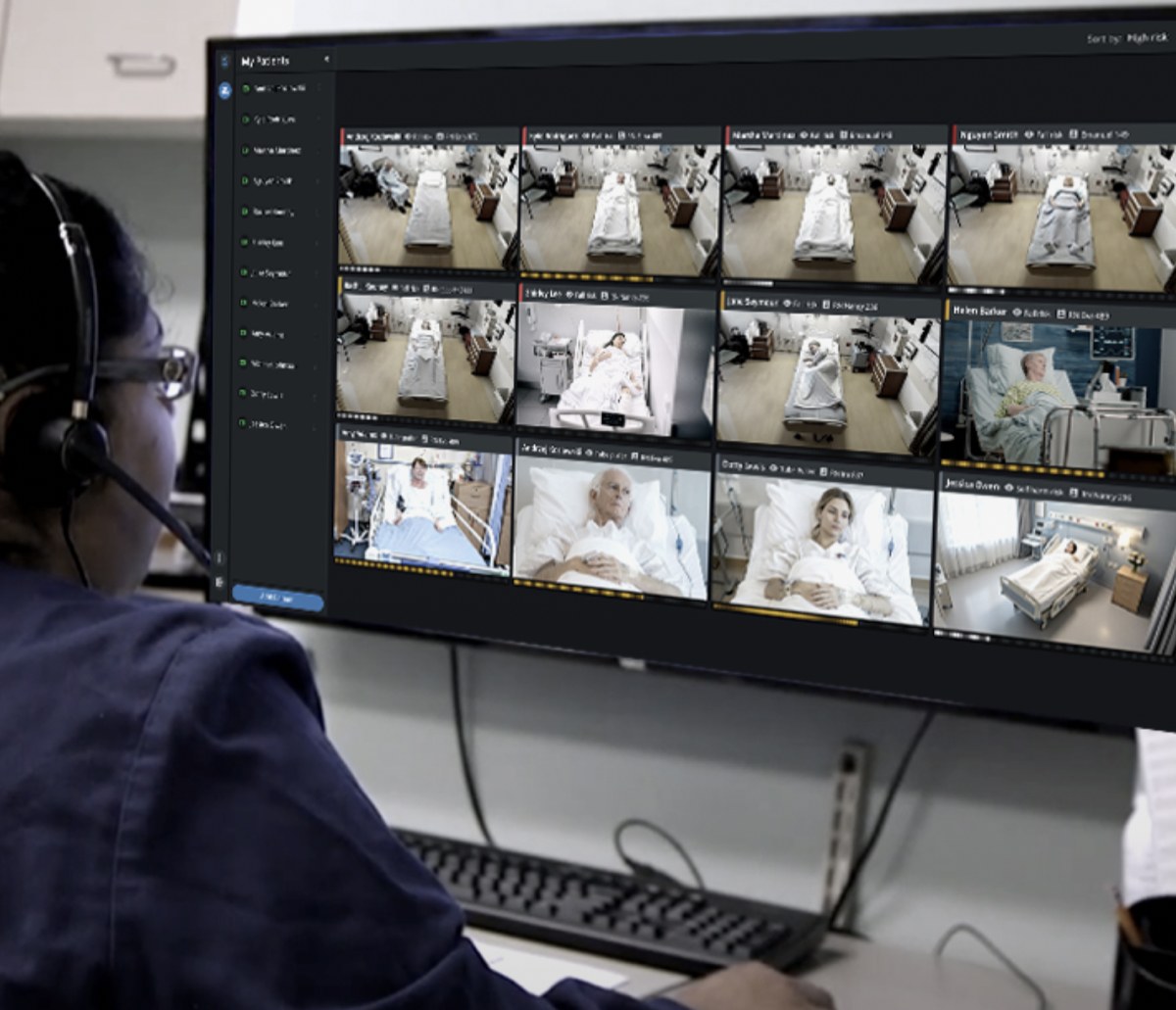
- LG’s patient observation app lets one remote technician monitor up to 16 hospital patients across ICU, step-down, and medical–surgical units.
- Problem
- One technician cannot watch every patient’s movements at once, so falls still happened even with constant monitoring. The system needed to help staff catch fall risk early, so they could prevent falls.
- Approach
- Interviews showed that staff wanted early warnings they could trust. Two detection methods were compared, and a virtual bed boundary was chosen for the MVP because it was faster to build, more reliable, and still warned staff early. After testing, controls for unnecessary alerts were added.
- Outcome
- The product launched in phases from April to July 2024, followed by general availability in August. It achieved a SUS score of 87 and contributed to 23% fewer falls, and 51% of alerts led to a logged staff action.
Problem
One technician cannot watch every patient
One remote technician may monitor up to 16 patients at once. When several patients move at the same time, continuous visual attention becomes difficult.
The product had to warn staff of fall risk early enough for them to act, without asking technicians to watch every feed more closely.

User research
Staff needed earlier, patient-specific alerts
Seven users were interviewed: one operations manager, three telesitters, and three nurses with telesitter experience. Three needs guided the detection approach.
Detect risk earlier
Alert staff when a patient’s movement could lead to a fall, before the patient leaves the bed.
Adapt to each patient
Fall risk varies by mobility and medical condition, so alert settings need to be adjustable.
Watch concurrent movement
Help staff notice movement across multiple feeds when patients move at the same time.
Design exploration
Two detection methods compared
Two detection approaches were explored with engineering. One could detect movement earlier but needed far more development work and could raise more false alerts. The other was simpler and more predictable but detected risk later.
Option A — Posture analysis
Uses a custom-trained dataset to recognise movements that may lead to a bed exit.


- Pros
- Can detect intent before the patient reaches the edge of the bed
- Cons
- Requires a custom dataset, model training, and fine-tuning
- Can raise more false alerts if the model is not trained well enough
Option B — Boundary crossing
Uses a virtual boundary around the bed and alerts when the patient crosses or touches it.

- Pros
- Simpler rule-based detection
- High accuracy for in-bed and out-of-bed behaviour
- Cons
- Detects risk later than posture analysis
- Cannot identify movements such as raising up, shifting, or rolling while still inside the boundary
Boundary crossing chosen for the MVP
Boundary crossing detects bed-exit risk earlier than human monitoring and costs less to build than posture analysis. Posture analysis remained the long-term plan.
MVP design
One workflow from bed boundary to alert
The MVP combined detection, setup, and response in one workflow.
Define the patient's boundary
Staff reach Smart Rails setup from the side panel, the central place for configuring monitoring features such as Smart Rails, Canned Messages, and Blur Mode.

Boundary setup was placed on the live video feed, so staff define the bed area visually. Sensitivity and trigger delay adjust per patient, because mobility and fall risk differ.

See risk without leaving the feed
When a patient crossed the boundary, the alert appeared directly on the video. This let technicians scan multiple rooms and identify the patient who needed attention.

Record each event
A timestamped patient log was added for alerts, interventions, messages, privacy mode, and virtual rounding, so the care team can review what happened.

Usability testing
Easy to use, but false alerts were a problem
Five users tested the prototype remotely: two Intermountain patient safety monitors, two nurses, and one remote safety technician. The prototype scored 87 on the System Usability Scale (SUS).
The main problem was not finding or using Smart Rails. It was knowing what to do when an alert appeared but nothing was wrong.
Design iteration
Controls for unnecessary alerts
After testing, the alerts were changed to fit how staff actually work.
Delay alerts for brief movements, mute when no action is needed
A configurable delay was added, so momentary movements do not trigger an alert right away. Mute mode silences alerts when staff are already present or privacy mode is on.

Snooze individual alerts
An inline Snooze action was added for false or nuisance alerts, and Smart Rails turns back on afterward.

Impact
Fewer falls after launch
Smart Rails launched in phases from April through July 2024, with general availability in August. Across the last 90 days compared with the previous period, the product showed:
“The real-time AI alerts help me respond faster and prevent falls more effectively. I’m way less tired by the end of my shift, and it’s made a real difference for both patient safety and my job satisfaction.”
Elizabeth N., Patient Safety Monitoring Technician
More projects